
LED lighting offers a long list of benefits over traditional lighting — energy efficiency, longevity, smaller environmental impact, and lower cost of ownership over a lifetime just to name a few. That said, one of the (very minor) drawbacks of LEDs is that they require a consistent, constant flow of electrical current at an exact voltage in order to function properly and remain at a temperature that prevents them from malfunctioning. This is controlled by an LED driver.
LED drivers are — you guessed it — the engine that drives the function of LED lighting. It acts as a current management system for one or more fixtures and creates a buffer that offers protection from currents and temperatures that are too high. Because LEDs work on DC power (instead of AC) the driver also converts that power and prevents power surges. In fact, most LED failures happen because of the driver and not the lighting itself.
There are two types of LED drivers: Constant voltage and constant current.
Constant voltage: These drivers are used for LED lighting and fixtures that require steady, constant, low-voltage DC power. A constant voltage is commonly used with LEDs that have a driver built into the light or fixture, and all it really needs is a tool to help control that consistent voltage. Constant voltage drivers are often used for applications like landscape and accent lighting, backlighting, and large-scale and high-definition LED lighting.
Constant current: Typically these drivers are used for LED lighting that doesn’t already have a current driver built into it. Constant current drivers regulate the current that enters the LED, preventing too much current that could overhead the LED and lead to malfunctioning. There are several different configurations of these drivers and they work well with a series of LED lights or fixtures to keep current consistent.
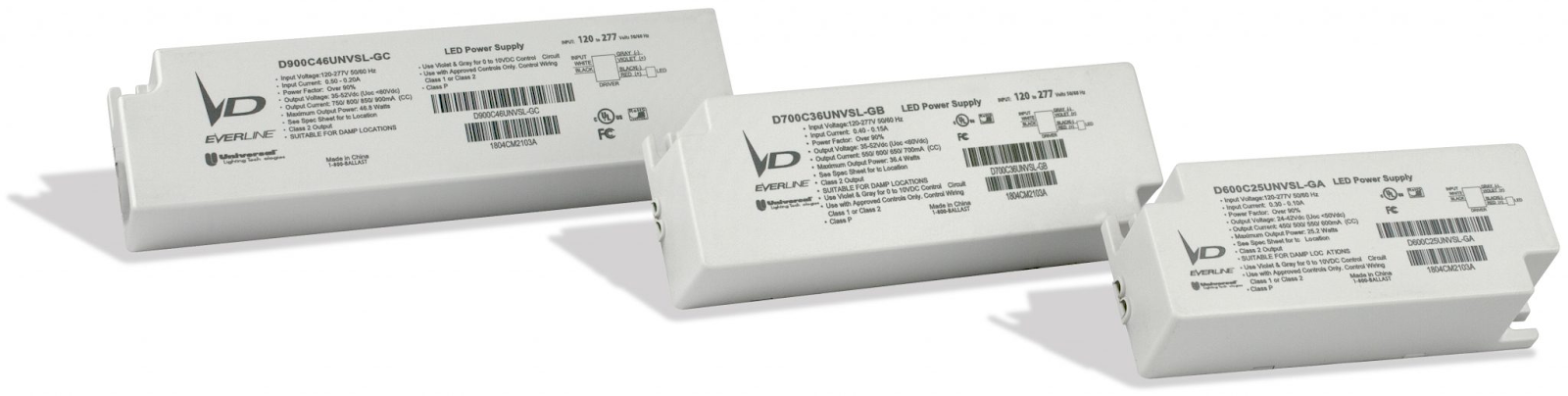
Many times, especially in industrial applications, LEDs are configured in a series or parallel to each other, and knowing more about these configurations helps give a better idea of how LED drivers work. A series of LEDs connect to each other to form a single, continuous current in a series or a “string.” A driver in this instance would have to control the total voltage required to run all LEDs in the series. For parallel configurations, LEDs are placed side by side and controlled by a driver. There could even be parallel strings of LED lighting. Drivers can also control the dimming and color change capabilities of LEDs.
As warranties on older LED products expire, it’s important to quickly identify the drivers needed to keep lighting functioning properly. New technology, including Touch To Tune from Universal Lighting, allows our experts here at Starbeam to provide these drivers, connect them to a mobile app, and control the LEDs simply and easily. For customers that might want to even “Do It Yourself” DIY, here is how Kevin Boyce, Director of Product Management for LED Drivers at Universal Lighting Technologies tells us how its done:
“Replacing the driver rather than the entire fixture saves the end-user time while maintaining ideal design continuity in the space. At Universal, we are consistently focused on making the most advanced, user-friendly products available to all our customers, and we’re confident Touch to Tune will make their job easier.”
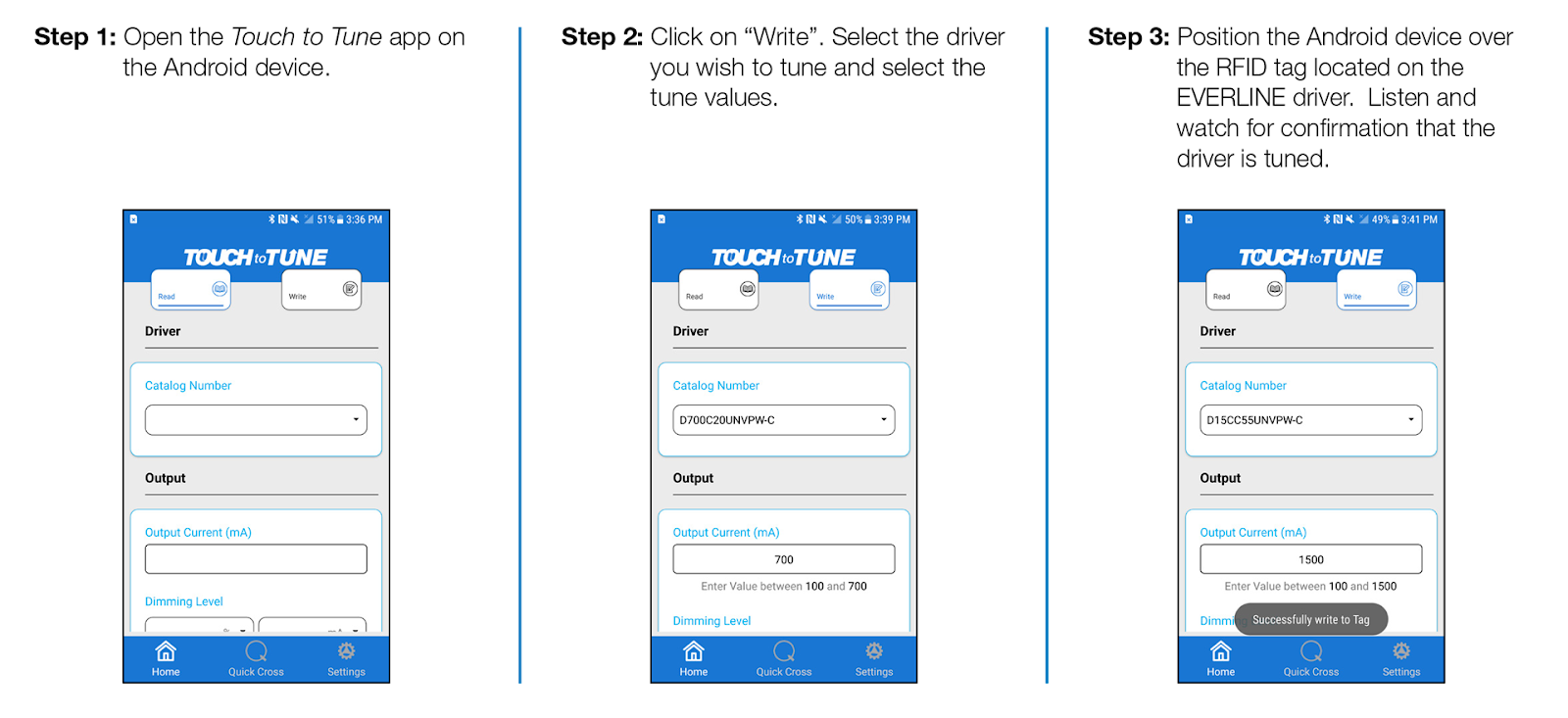
The Touch To Tune app uses near-field communication (NFC) to communicate with drivers and devices, allowing for tuning that controls output current, minimum dim current, dimming curve, full bright control voltage, minimum dim control voltage, and dim-to-off voltage.
Because the Touch To Tune app is compatible with Universal Lighting products, it’s important to work with a qualified LED distributor who is authorized to sell and install them — like Starbeam. Our team has been extensively trained on the product types and usage instructions for Universal Lighting, and we can show you first-hand how to get a return on your investment.
LED drivers are a crucial part of LED lighting function, but upgrades don’t need to be complicated or offer a steep learning curve, especially when you use tools like Touch To Tune. If you’d like to learn more about adding Universal Lighting products to your facility, get in touch with our team to have a conversation about your options and decide if they’re right for your building.
The post What are LED Drivers? appeared first on Starbeam Lighting.